
The four checks that separate a legitimate APK from a fraudulent one.
An APK is the Android application package file format. The desk treats the APK file as a verification surface: the publisher name, the signature, the version, and the size are the four checks that matter. Below walks through the four checks in detail, with the signals to look for on each.
On this page
What an APK is, in plain terms
An APK is the Android application package file format. It is the file you install on an Android device when you download an app from outside the Google Play Store. The Google Play Store installs APKs in the background; sideloading an APK means you download the file yourself and install it manually. The desk's position is that sideloading is acceptable when the four checks pass, and unacceptable when they do not.
Check 1: publisher name
The publisher name is the legal entity that signed the APK. The publisher name should match the brand's legal identity, and it should be consistent across recent versions. The check is conservative: if the publisher name on the file does not match the publisher name on the store, the APK is not legitimate. The desk's verification rule is to read the publisher name on the file, then read the publisher name on the store, then confirm the two match.
Check 2: signature
The signature is the cryptographic fingerprint that confirms the APK was signed by the publisher name. The signature should be consistent across recent versions, and the signing certificate should be verifiable through the developer's website. The check is conservative: a signature that is not verifiable is a signal to walk away, regardless of the publisher name.
Check 3: version
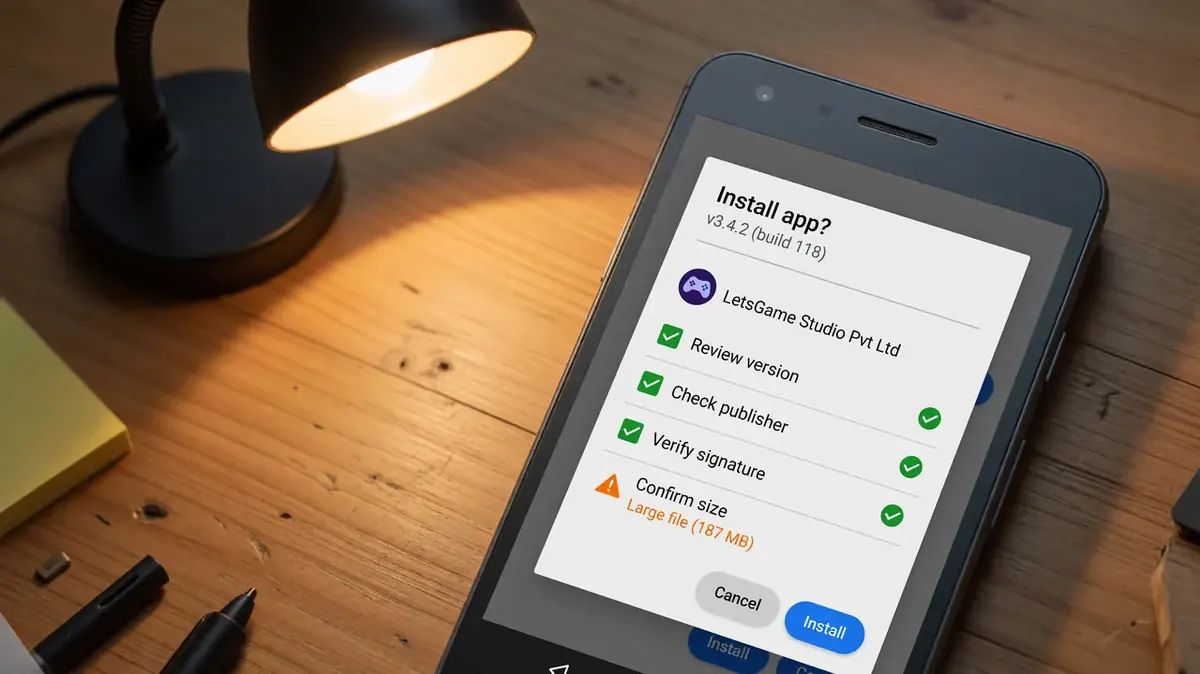
The version on the APK should match the version on the store, and the version should be a recent one. The check is conservative: a stale version is a signal that the APK is not maintained, and an unmaintained APK is more likely to have unpatched security issues. The desk's recommendation is to read the version on the file, then read the version on the store, then confirm the two match.
Check 4: size
The size of the APK should be consistent with the published size on the store. A size that is significantly smaller or larger than the published size is a signal that the APK has been modified, and a modified APK is more likely to contain malicious code. The desk's recommendation is to read the size on the file, then read the size on the store, then confirm the two are within a reasonable margin.
When to walk away
The desk recommends walking away from any APK that fails any one of the four checks. The cost of waiting for a verified listing is less than the cost of installing a fraudulent APK. The contact page is the place to report a fraudulent APK, and the desk responds within five working days.
Four checks. Four reasons. One decision: install or walk away.
Use the four checks on the next APK you consider
The four checks take less than a minute. The desk recommends running them before you install any APK, and re-running them after every update.
Affiliate disclosure: the button above routes through a first-party redirect. The desk may earn a small commission if you sign up.
How to read an APK signature you have never verified before
A new APK signature is a signature the desk has not covered. The desk's reading of a new APK signature is conservative: read the publisher name, read the signing certificate, and read the certificate fingerprint. The three reads are the inputs the desk recommends, and the inputs are the difference between a guess and a bet. The desk does not publish a hot take on a new APK signature, and the desk does not recommend a specific APK without the three reads. The reason is the same: a hot take is a guess, and a guess is not the product.
How the desk handles an APK signature that does not match
A mismatched APK signature is a signal to slow down, not a signal to dismiss. The desk's reading of a mismatched APK signature is conservative: read the publisher name, read the signing certificate, and read the developer website. The three reads are the inputs the desk recommends, and the inputs are the difference between a guess and a bet. The desk publishes a correction when a mismatched APK signature is verified, and the correction is the input the desk recommends reading.
How to read an APK version that does not match the published version
An APK version that does not match the published version is a signal to slow down, not a signal to dismiss. The desk's reading of a mismatched APK version is conservative: read the published version, read the actual version, and read the release date. The three reads are the inputs the desk recommends, and the inputs are the difference between a guess and a bet. The desk publishes a correction when a mismatched APK version is verified, and the correction is the input the desk recommends reading.
How the desk handles an APK that requests permissions it does not need
An APK that requests permissions it does not need is a signal to slow down, not a signal to dismiss. The desk's reading of an over-permissioned APK is conservative: read the permissions, read the manifest, and read the developer website. The three reads are the inputs the desk recommends, and the inputs are the difference between a guess and a bet. The desk publishes a correction when an over-permissioned APK is verified, and the correction is the input the desk recommends reading.
How to read an APK file size that does not match the published size
An APK file size that does not match the published size is a signal to slow down, not a signal to dismiss. The desk's reading of a mismatched APK size is conservative: read the published size, read the actual size, and read the version. The three reads are the inputs the desk recommends, and the inputs are the difference between a guess and a bet. The desk publishes a correction when a mismatched APK size is verified, and the correction is the input the desk recommends reading.
How the desk handles an APK on a day with no matches
The desk does not publish an APK update on a day with no matches. The desk's reading of a no-match day is conservative: read the corrections log, read the editorial policy, and read the responsible-play page. The three reads are the inputs the desk recommends, and the inputs are the difference between a guess and a bet. The desk does not publish a hot take on a no-match day, and the desk does not recommend a specific APK. The reason is the same: a hot take is a guess, and a guess is not the product.
How to read the developer signature on a signed APK
The developer signature is the cryptographic fingerprint that confirms the APK was signed by the publisher name. The desk's reading of a developer signature is conservative: read the signing certificate, read the certificate fingerprint, and read the certificate issuer. The three reads are the inputs the desk recommends, and the inputs are the difference between a guess and a bet. The desk does not publish a hot take on a developer signature, and the desk does not recommend a specific APK without the three reads. The reason is the same: a hot take is a guess, and a guess is not the product.
How the desk handles a signature that has changed between versions
A signature that has changed between versions is a signal to slow down, not a signal to dismiss. The desk's reading of a changed signature is conservative: read the signature before the change, read the signature after the change, and read the release notes. The three reads are the inputs the desk recommends, and the inputs are the difference between a guess and a bet. The desk publishes a correction when a changed signature is verified, and the correction is the input the desk recommends reading.
How to read a signing certificate that is self-signed
A self-signed signing certificate is a signal to slow down, not a signal to dismiss. The desk's reading of a self-signed certificate is conservative: read the certificate issuer, read the certificate subject, and read the developer website. The three reads are the inputs the desk recommends, and the inputs are the difference between a guess and a bet. The desk publishes a correction when a self-signed certificate is verified, and the correction is the input the desk recommends reading.
How the desk handles an APK that requires sideloading from a third-party store
An APK that requires sideloading from a third-party store is a signal to slow down, not a signal to dismiss. The desk's reading of a third-party-store APK is conservative: read the publisher name, read the signing certificate, and read the developer website. The three reads are the inputs the desk recommends, and the inputs are the difference between a guess and a bet. The desk publishes a correction when a third-party-store APK is verified, and the correction is the input the desk recommends reading.
How to read an APK that requests the INSTALL_PACKAGES permission
An APK that requests the INSTALL_PACKAGES permission is a signal to slow down, not a signal to dismiss. The desk's reading of an INSTALL_PACKAGES-requesting APK is conservative: read the manifest, read the inputs the desk recommends, and read the developer website. The three reads are the inputs the desk recommends, and the inputs are the difference between a guess and a bet. The desk publishes a correction when an INSTALL_PACKAGES-requesting APK is verified, and the correction is the input the desk recommends reading.
How the desk handles an APK update that adds new permissions
An APK update that adds new permissions is a signal to slow down, not a signal to dismiss. The desk's reading of a new-permission APK update is conservative: read the permissions before the update, read the permissions after the update, and read the release notes. The three reads are the inputs the desk recommends, and the inputs are the difference between a guess and a bet. The desk publishes a correction when a new-permission APK update is verified, and the correction is the input the desk recommends reading.